Some Definitions
A general tree is defined recursively as follows:
- A null tree (or null list) is a tree.
-
If I is a data element and if T1, T2, T3, ..., Tn are n trees, then
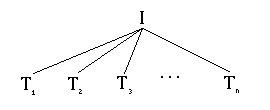
is also a tree.
| CS 415, Section 002 | Sonoma State University | Spring, 2022 |
|
Algorithm Analysis
|
||
|
Instructor: Henry M. Walker
Lecturer, Sonoma State University | ||
This reading introduces the concept of a tree data structure, describes a binary search tree as a specific type of tree, and considers how such a tree structure might be implemented.
A general tree is defined recursively as follows:
If I is a data element and if T1, T2, T3, ..., Tn are n trees, then
is also a tree.
I is called the root or root node, and each Ti is called a subtree of the tree. Nodes that have only null subtrees are called leaves or leaf nodes.
Since this definition is recursive, it may be applied multiple times to construct more complex trees, such as the one shown below:
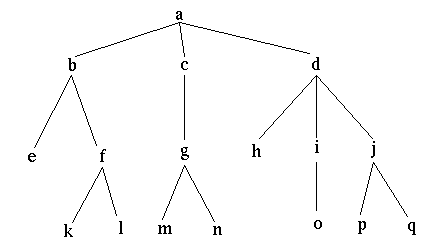
In this example, e, k, l, m, n, h, o, p, and q are leaves (or trees with null subtrees); a is the root of the overall tree. f is the root of a tree with k and l as subtrees, etc. Similarly, b is the root of a tree with two subtrees, one containing e and one containing f, k, and l.
A binary search tree or BST is a special type of tree, in which
A schematic view of such a tree follows:
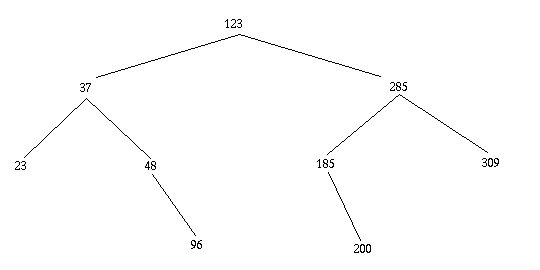
The implementation of a binary search tree in C++ involves three structural components:
The following discussion examines each of these levels in some detail.
Binary search trees provide a flexible and rather efficient structure for organizing and retrieving ordered data. For generality, it is convenient to collect the desired data into an Entry class. Consistent with many applications, this class likely requires the following methods (as a minimum):
To illustrate the use of data elements within a binary search tree, consider the application of developing a campus directory that contains both students and faculty. In this context, directory information might be stored in the Entry class with two subclasses, Student and Faculty:

This class hierarchy allows students and faculty to be intermixed within the campus directory.
To highlight principles of abstraction and unit testing, the Entry Class and its subclasses are defined in three files:
| Class | Header File | Implementation File | Testing file |
|---|---|---|---|
| Entry | Entry.h | Entry.cpp | EntryTest.cpp |
| Student | Student.h | Student.cpp | StudentTest.cpp |
| Faculty | Faculty.h | Faculty.cpp | FacultyTest.cpp |
With this organization,
g++ -c Entry.cpp
      g++ EntryTest.cpp Entry.o -o EntryTest
      ./EntryTest
For a binary search tree (or any binary tree, for that matter), each node will contain data, and each node will have a left and right field to designate addresses of the relevant subtrees — although either or both of the subtrees could be null. Thus, a TreeNode should have fields data, left, and right, together with constructors and methods to access and modify these fields.
In addition, binary search trees require that nodes conform to a special ordering — all nodes in a left subtree must have data smaller than in a root node, while all nodes in a right subtree must have larger (or equal) data. In order to maintain this property throughout the tree, we must be able to test the relative ordering of data. In C++, as noted above, we determine this ordering by overloading the relational operators for objects of the Entry class and its subclasses.
Class TreeNode illustrates a typical declaration for such a node class. In this case, good design dictates that this class be written to work with any type of data element (as long as the data can be created, compared, and printed). This desire for generality/flexibility has several conceptual and practical consequences.
A binary search tree (BST) provides a flexible and reasonably efficient structure for the storage and retrieval of data. In a university directory application, a user would search a directory by name, and a successful search would return additional information about the individual.
Before implementing any class, we must identify the appropriate operations. Some common operations for a Binary Search Tree class include:
In the following discussion, we outline an algorithm for several of these operations, sometimes describing an iterative approach and sometimes using recursion; often either iteration or recursion could be used for these operations.
For our implementation, we also need an image of how a BSTree class will package tree information. Here, various tree nodes to point to their subtrees within the BSTree. Thus, the BSTree class itself only need specify the initial node or root. As an example, the following diagram shows a binary search tree, annotated to show the data type of various components.

Class BSTree implements a binary search tree, including several methods already identified.
The reader is encouraged to review various elements of the code in conjunction with the following commentary on the various methods.
The definition of Class TreeNode motivates Class BSTree to be written as a templated class. Thus, BSTree.h contains both header and implementation code.
As with lists, an initial binary search tree will be empty. This may be implemented by setting the root field to null.
Searching in a binary search tree proceeds downward from the root, following a reasonably common recursive pattern.
The idea of the lookup method is to take a data element as a parameter and to return that data element. However, at a detail level, a question within C++ arises as to whether the parameter and the return type should be an object or a pointer to the object. Both could work, leading to several design issues.
If the lookup method returns an address, then the result would be either a pointer to a data element or a null value. Including the call within a conditional statement allows simple checking:
      Entry ptr;
      if ((ptr = lookup (---)) == NULL) {
          // not found
      } else P
          // found
      {
A recursive algorithm starts at the root and applies the following steps for each node:
The above sequence of events is called an in-order traversal of a tree. Similarly, printing the data at the node, then the left subtree, and then the right subtree is called a pre-order traversal. Printing the data in the node last gives a post-order traversal.
For variety, we use an iterative approach to insert entries into a tree. To start, a simple base case checks whether the tree is empty. If so, a new node is generated, initialized with the relevant data, and identified as the new root.
To understand the rest of the insertion process, consider the insertion of the number 153 into the following tree (which repeats the tree given above).

To insert 153, we start at the top of the tree. Checking that 153 comes after the value in the root (123), we advance to the right subtree. We now check that 153 comes before 285, so we advance to the left subtree of 285. Again, we compare 153 with value 185, and realize we should move left. Here, however, we discover there are no further nodes. Thus, we create a new node, place 153 in that node, and identify the new node as the left child of 185's node.
In the code for insert, the variable ptr keeps track of where we are as we work downward node-by-node from the root. To test if an item (newEntry for the BSTree code) comes before the value in a node, we use the following sequence:
The complete directory program DirectoryBST.cpp combines all of the classes discussed in this reading (Entry, Student, Faculty, TreeNode, and )BSTree).
For convenience, all files within this example are packaged together in the compressed file tree-package.tgz.
Although individual files identified in this reading could be downloaded and stored separately, these files are compressed into a single file, trees-package.tgz. After downloading this file, unpack it with the command
tar -xvf tree-package.tgz
Since compiling the complete program requires creating object files for the Entry and its subclasses, as well as handling the templated classes (TreeNode and BSTree) and the application DirectoryBST, the variou> completion steps are organized into a Makefile—also included in the compressed file. After decompressing all files, move the newly created directory and type
make DiretoryBST
When completion has completed, run the test program with the command
./DirectoryBST
|
created 18 April 2000 revised 24 March 2005 revised 5 April 2012 modest editing 22 April 2012 translated from Java to C++ January 2021 |


|
| For more information, please contact Henry M. Walker at walker@cs.grinnell.edu. |